Small business CRM: when to adopt and where to start
Signs it is time for a CRM, what to set up first, how to move data and train the team, and whether to use a ready-made system or build your own.
Published: Updated: 8 min read
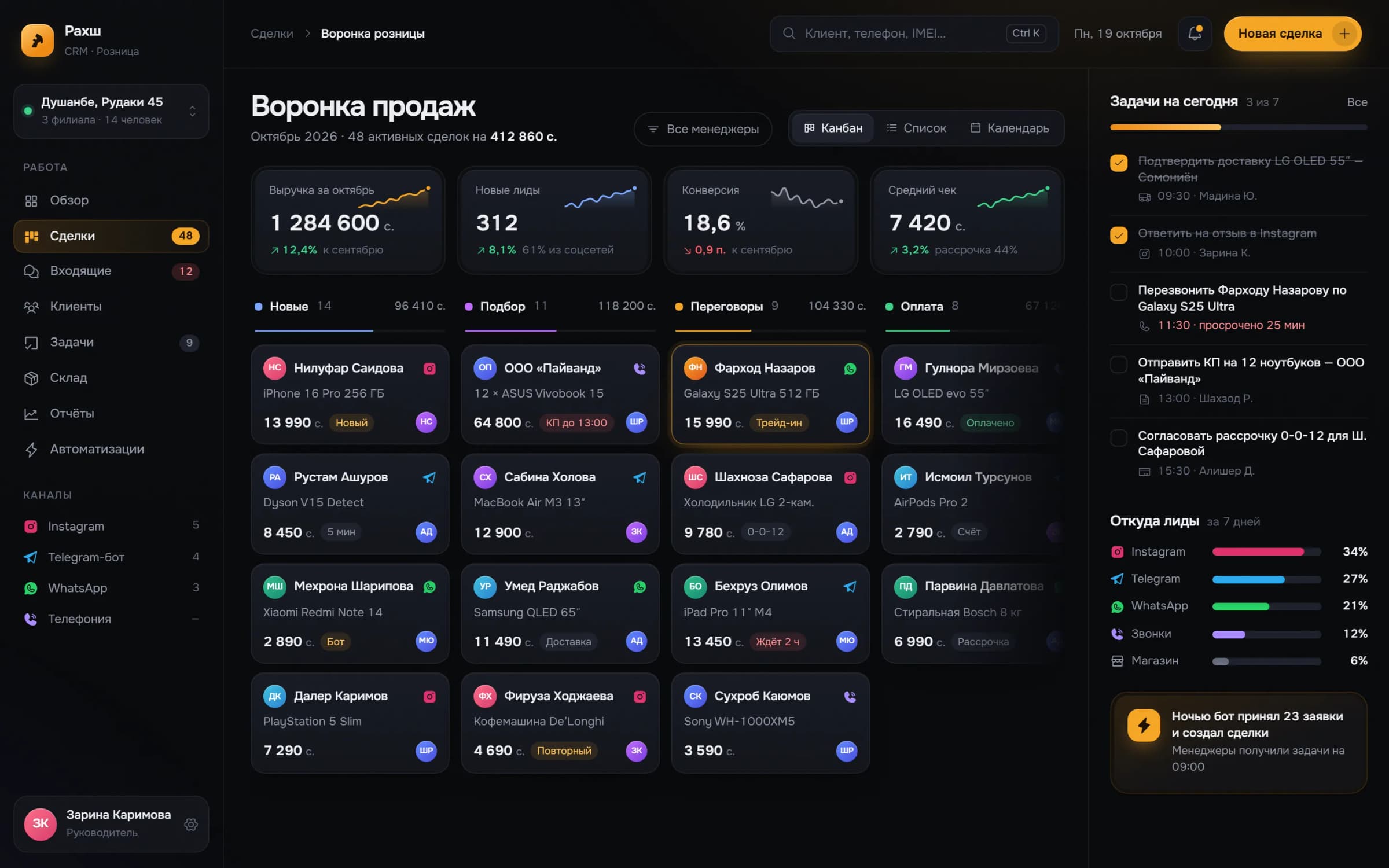
A CRM is a system for working with clients. In a small business it tends to be put off: "there are only five of us, a spreadsheet will do." Sometimes that is true. But a spreadsheet has a limit, and it usually shows up the moment an enquiry gets lost and the client goes to someone else. This guide covers when a CRM is really needed, where to start and how to avoid a long project that nobody ends up using.
What a CRM is, in plain words
A CRM keeps the history of communication with each client and shows what stage each deal is at. You can see where an enquiry came from, who is handling it, what the client was promised and when to follow up.
Three functions matter more than any product name:
- a single list of all enquiries;
- clear statuses that an enquiry moves through;
- tasks and reminders so nothing is forgotten.
Everything else, such as reports, automation and integrations, grows out of these three.
Signs it is time
If you recognise yourself in several of these, a CRM will help.
- Enquiries arrive from several places: the website, calls, messengers, social networks, direct messages to staff.
- Nobody can quickly say how many enquiries came in this week and how many turned into deals.
- Client information lives in a manager's head and disappears when they go on leave or leave the company.
- Clients get slow replies because nobody noticed the message in time.
- You ask clients again for things they have already told you.
- It is unclear which channel brings real sales and which only brings costs.
- The spreadsheet has grown, there are several versions and everyone edits their own.
If none of this applies and you have few clients and everything is under control, a CRM can wait. It is better to adopt a system when the pain is clear than "for growth" just for the sake of order.
Where to start: the minimum version
The most common mistake is trying to launch everything at once: pipelines, fields, reports, automation. A month later the team goes back to the spreadsheet because the system is too complicated. Start small and add as the habit forms.
1. One list of enquiries
Collect all enquiries in one place. Anything that arrives from the site, a messenger or a phone call must land in the shared list. The rule is simple: if it is not in the system, it did not happen.
2. Sources
Mark the source of each enquiry: website, call, messenger, referral, advertising. In a month you will see where clients really come from. This is the fastest benefit of a CRM and needs no complex setup.
3. Statuses
Define four to six stages that your typical deal goes through. For example: new, in progress, proposal sent, awaiting decision, won, lost. The names should make sense to the staff, not only to the manager. Do not create more statuses than needed, because each extra stage is a chance for confusion.
4. An owner and tasks
Every enquiry has a person behind it. Every active enquiry has a next step with a date: call, send a quote, follow up. The system reminds you. That is how enquiries stop getting lost.
5. Reasons for loss
When a deal is lost, record the reason from a short list: too expensive, chose someone else, changed their mind, no reply. After two or three months the data will show what to change in your offer.
Once this base works reliably, add reports, message templates, automatic task creation and connections to the website and messengers.
Moving data
Old data is valuable, but move it sensibly.
- Decide what to move. Active clients and recent deals, definitely. A five-year-old archive can stay in the spreadsheet.
- Clean it. Merge duplicates, bring phone numbers to one format, delete what is clearly useless. Moving junk just moves the problem.
- Define the fields. Do not copy every column of the spreadsheet. Keep the ones you actually use.
- Move a trial batch. Load a hundred rows, check how they look, and only then move the rest.
- Keep a copy. Do not delete the original spreadsheet until you are sure everything arrived.
If data is stored in several places, collecting and cleaning it is a separate task. We estimate it after looking at your materials.
Training the team
A system nobody uses is worse than a spreadsheet. The rollout works when staff find it easier to work in the CRM than without it.
- Show with real examples how an enquiry travels from first contact to a deal.
- Explain what the system gives each employee personally: reminders, history, fewer manual reports. Not only the manager.
- Agree a few simple rules: all enquiries are entered within the working day, statuses are updated at once, the next step is always set.
- Name one person who answers colleagues' questions in the first weeks.
- The manager should look in the CRM too, rather than asking for a report in a messenger. Otherwise the system stays a formality.
Typical mistakes
Too many fields. The manager spends more time filling in than talking to the client. Keep only what you really use.
No process owner. If nobody is responsible, the system slowly gets cluttered. Name a person who keeps it tidy.
Parallel spreadsheets. While a spreadsheet and a CRM live side by side, the data drifts apart. Choose one place.
Automation before process. You cannot automate what is not described. Agree on statuses and rules first, then configure automatic actions.
Rollout over a weekend. A CRM changes habits. Leave time for training and the first weeks of support.
Expecting the system to sell. A CRM shows where you lose clients, but the team still does the selling.
Ready-made CRM or your own system
Each approach has its own place.
| Question | Ready-made CRM | Custom system |
|---|---|---|
| Launch | Faster, core functions exist | Slower, needs development |
| Fits when | The process is standard: enquiries, statuses, tasks | The process is unusual, with many specific rules |
| Flexibility | Limited by the product | Adapts to you |
| Integrations | Some ready, some extra | Built for your systems |
| Cost | Usually a subscription per user | Development and maintenance |
| Dependence | On the service provider and its terms | On the contractor, unless you hold the source code and access |
For most small companies a sensible start is a ready-made system set up around your process. Custom development makes sense when the process is unique, ready-made tools are awkward or you need deep links with other systems. In both cases the process is described first and the tool chosen second.
When choosing a ready-made system, check whether it has an interface in the language you need, how you can export your data if you want to leave, how data storage and access work and whether it can connect to your website and messengers.
Connecting the CRM to everything else
The benefit grows when enquiries reach the system on their own. Website forms, messenger conversations and calls can all be sent to the CRM automatically. The less manual entry, the fewer gaps. Such connections are integrations. Simple ones are set up quickly, while exchange with accounting systems, telephony and banking services is estimated separately, after reviewing your setup.
A plan for the first month
- Week 1: describe the enquiry path, pick four to six statuses and a list of sources.
- Week 2: configure the system, move active clients and run training.
- Weeks 3 and 4: work only in the CRM, collect feedback and remove unneeded fields.
- After a month: see which sources perform better and where enquiries are lost, and decide what to automate next.
If you are not sure whether a ready-made system fits or you need your own, start by describing the process. We can help you work through it at the first conversation about your task.
<!-- related-links -->